Home App: From a Shopping List to a Private Home System
Home App began as a shared shopping list and grew into a private home system: tasks, calendar, notifications, notes, Home Assistant, and a local AI agent. The best production test turned out to be the family itself.
Focus Area
App Development
Depth
Intro
Stack
It started with household shopping
Home App started from a banal problem: a shared shopping list. Not from architecture, not from a stack — from the fact that someone added milk, someone else was already at the store, and the information arrived one floor too late. A classic enterprise-grade problem: a distributed system made of a few people and one fridge couldn't reach consensus.
Then came tasks, a calendar, reminders, notebooks, a integration, and a local AI agent. At some point it stopped being a side project. It became a small production system — except that instead of anonymous users it has household members, who report a failure immediately, usually at the dinner table.
As of v2.12, Home App has: multi-user auth with roles, task management, a family calendar with reminders, personal notebooks with full-text and semantic search, Home Assistant widgets, an AI chat assistant powered by a local LLM, and a notification system that routes messages per-user to ntfy or Telegram.
Why a family tests better than localhost
On localhost everything works. Except localhost doesn't do the shopping, doesn't forget about training, and doesn't ask for the third time whether the calendar has refreshed yet. It's the real, non-technical users who find bugs where nobody looked — and they do it faster than any test suite.
There's no formal here. There's something more effective: the question from the kitchen asking why the reminder never came. The tolerance window is small — a scheduled reminder either fires on time, or someone asks, and not just once.
Decision 1: shared first, private only when needed
In a typical app everything is "yours," and whatever someone else should see has to be shared manually. At home that's tiring — the shopping list and calendar are meant to be shared from the start, without clicking "share." So in Home App the default is the household: shared things are shared by design, and household members are simply whoever happens to be logged in.
But not everything is for everyone. Tasks and notes have a visibility level — shared, parents-only, or private — so gifts or grown-up matters don't end up in front of the kids. This isn't a fancy data model, it's domestic ergonomics: you don't have to manually share what's shared anyway, and what's private stays private. Underneath, one rule enforces it: every query starts from the family boundary, and visibility decides the rest.
-- The boundary is the family (profile_id); visibility decides who sees what
SELECT * FROM tasks
WHERE profile_id = $1
  AND (
    visibility = 'shared'
    OR (visibility = 'parents_only' AND $2)          -- $2 = parent role
    OR (visibility = 'private' AND created_by = $3)  -- $3 = user id
  );
In July, while reviewing the application's security myself, I found a simple but important mistake: a role says what you are allowed to do, but not whose data you are allowed to do it with. A parent could add themselves to someone else's private profile with a single request, then pass all the membership-based checks — they could grant themselves the key to the door. Now the app asks two things about everything: what role you have, and whether you belong to that profile. An administrator must belong to it too; the other adult's private profile must remain private from me as well. All 16 checks passed after the fix, although the compiler saw no problem: the types matched, the permissions did not.
Decision 2: notifications are a household SLA
Notifications quickly stopped being a plain "send a message." It's a separate system: per-user routing (ntfy or Telegram), severity thresholds, and quiet hours. A high-severity alert goes through immediately; the rest, if it lands during quiet hours, goes into a queue and waits — an n8n workflow checks it every 15 minutes and releases the messages once quiet hours end. It sounds like overkill, until you hear at breakfast that a reminder "was an hour late because it sat in a queue."
# The notification flow:
# Alertmanager → n8n Dispatcher → GET /api/notifications/targets
#   → per-user: ntfy | Telegram
#   → quiet hours: INSERT INTO notification_queue
#   → n8n every 15m → POST /api/notifications/process-queue
Decision 3: AI as a remote control for the home, not a gadget
The AI agent in Home App isn't a chatbot for small talk. It has persistent memory and a set of tools: it reads alerts, searches and creates notes, checks the weather, and — most interestingly — controls the home through Home Assistant. So it can actually do something, not just answer: send a robot to clean the living room, or check the dishwasher's state. The same home where a barcode scan tells you which bin the packaging goes into.
A good example of the line between architecture and interface: a question from a watch — "how long until the cake is done?" If the oven, or even just a timer, is an entity in Home Assistant, the agent reads the remaining time and answers by voice. This isn't a new architecture — it's the same agent and the same tools, just asked from the wrist.
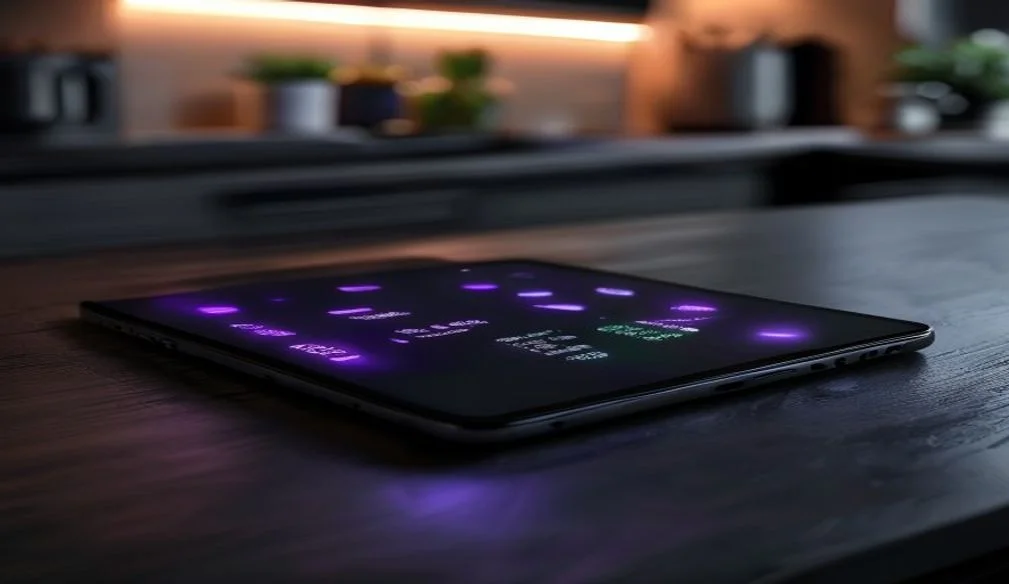
The interesting part is that new scenarios don't require rebuilding the app. If the oven timer, a plant sensor, or the dishwasher are entities in Home Assistant, the agent reads them with the same tool. The interface changes — a watch, a kitchen tablet, voice — but the foundation doesn't.
The core runs locally: an model runs on the home server, so prompts, notes, and context never leave the building. The real constraint is hardware — without a , simple replies are acceptable, but agent requests that use tools can take several minutes. That is an honest trade-off for privacy and offline operation, not a promise of speed.
How it works together
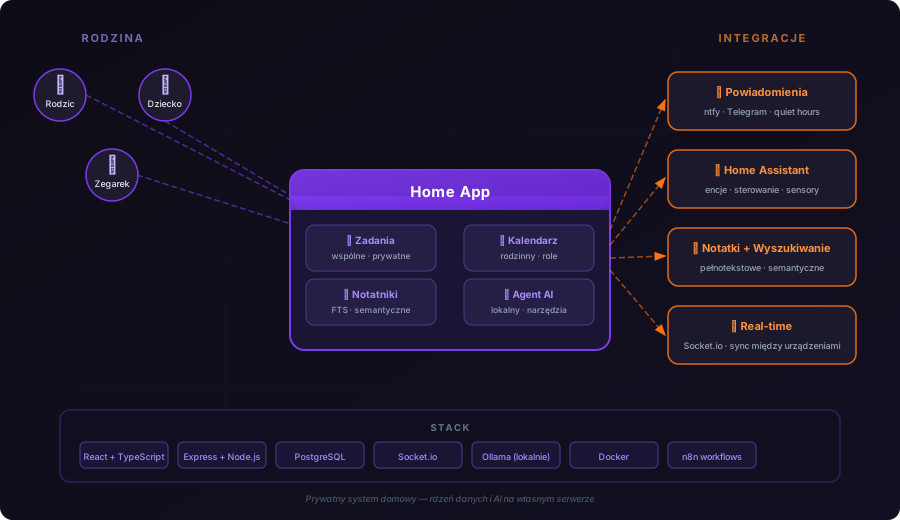
In practice, Home App is a layer between the household, the database, notifications, and Home Assistant devices.
Under the hood: a boring stack
Deliberately boring: + on the frontend, + TypeScript on the backend, (no , raw parameterized queries), for real-time events. No on the backend, no , no . The reason is mundane: at 2am, when a reminder didn't fire, you don't want to discover a framework's philosophy — you want to read what happened and fix it.
For a close-up of what that boring stack looks like at the level of a single feature, see the notebook with camera, voice and OCR.
What this project taught me
It's still a home app. It doesn't serve a million users, has no team and no roadmap in Jira. But it works for people who actually use it — and that was enough for an ordinary shopping list to start requiring permissions, roles, queues, real-time, notifications, and a local agent.
Because Home App isn't a shopping app, a calendar, or an AI app. It's a layer that joins household members, data, and devices into one private home system — without more logins, subscriptions, and data sent who knows where.
For a project meant to solve the milk-at-the-store problem, this went suspiciously far.
Frequently asked questions
Is this a finished product I can buy?
No. It's a private app running on my home server — the case study shows the decisions and architecture, not a product for sale.
Why not just use ready-made apps (Todoist, Google Calendar)?
I wanted the family's data to stay at home — without subscriptions or sending it to companies — and to learn on a real, daily-used system.
What technologies power the app?
React and TypeScript on the front end, Express and PostgreSQL on the back end, Socket.io for real-time, plus local AI (Ollama) and Home Assistant.